


Google Ads reports ROAS based on the conversion value it tracks. That number is useful for bidding, but it isn’t revenue. Refunds, failed payments, trial users who never convert, subscriptions that churn after one month, and conversion values set to a placeholder all push platform ROAS away from reality. Calculating Stripe Google Ads ROAS means dividing ad spend by money that actually landed in your Stripe account, by campaign, so budget decisions rest on real revenue.
This guide covers why platform ROAS and real ROAS diverge, how to connect Stripe payments to Google Ads clicks, how to calculate true ROAS for one-time and subscription revenue, and what to do with the result.
Why Google Ads ROAS Isn’t Your Real ROAS
| Source of the gap | Effect on reported ROAS |
|---|---|
| Static or estimated conversion values (for example, every sign-up worth $100) | Can be wildly high or low, depending on the estimate |
| Free trials counted as conversions | Inflated, because many trials never pay |
| Refunds and chargebacks | Inflated, since the original conversion value stays in Google Ads |
| Failed or declined payments | Inflated if the conversion fires before payment succeeds |
| Subscription renewals | Understated, because recurring revenue after the first payment isn’t counted |
| Modeled and view-through conversions | Can credit Google Ads for revenue it influenced only partially |
Some of these inflate ROAS and others deflate it, so the direction of the error differs by business. That’s exactly why you need to measure it rather than assume.
How to Connect Stripe Payments to Google Ads Clicks
The core problem is that Stripe knows who paid and how much, but not which ad they clicked. You need a link between the two.
Option 1: Capture click IDs and UTMs at sign-up
When a visitor arrives from Google Ads, the URL contains a gclid (or related click identifiers) and, if you use them, UTM parameters. Store these on the user record when they sign up or check out. Then write them to the Stripe customer’s metadata. Every later payment from that customer can now be traced back to the original campaign.
Option 2: Send Stripe revenue to Google Ads as offline conversions
Using the stored click ID, you can upload actual payment amounts to Google Ads as offline conversions, or use enhanced conversions for leads. This improves platform ROAS accuracy and lets smart bidding optimize toward real revenue instead of estimated values.
Option 3: Join in a reporting or analytics tool
If both Stripe and Google Ads are connected to the same analytics tool, and Stripe customers carry campaign identifiers, spend and revenue can be joined by campaign for reporting, without changing what Google Ads sees.
Options 1 and 2 together are the strongest setup: accurate reporting and better bidding.
Calculating True ROAS
For one-time purchases
True ROAS = (Stripe revenue from campaign customers − refunds) ÷ campaign spend
Use net revenue after refunds and, if you prefer a stricter view, after payment processing fees.
For subscriptions
Subscription businesses need a time dimension. Three useful views:
- First-payment ROAS: first invoice revenue ÷ spend; comparable to most platform reporting but understates value
- Cohort ROAS at 90 days: all revenue collected in the first 90 days from customers acquired by the campaign ÷ that campaign’s spend in the acquisition period
- Projected LTV ROAS: expected lifetime revenue per customer × customers acquired ÷ spend; useful for planning, but label it clearly as an estimate
Cohort ROAS is usually the most honest comparison between campaigns, because it accounts for both churn and renewals over a fixed window.
A Worked Example
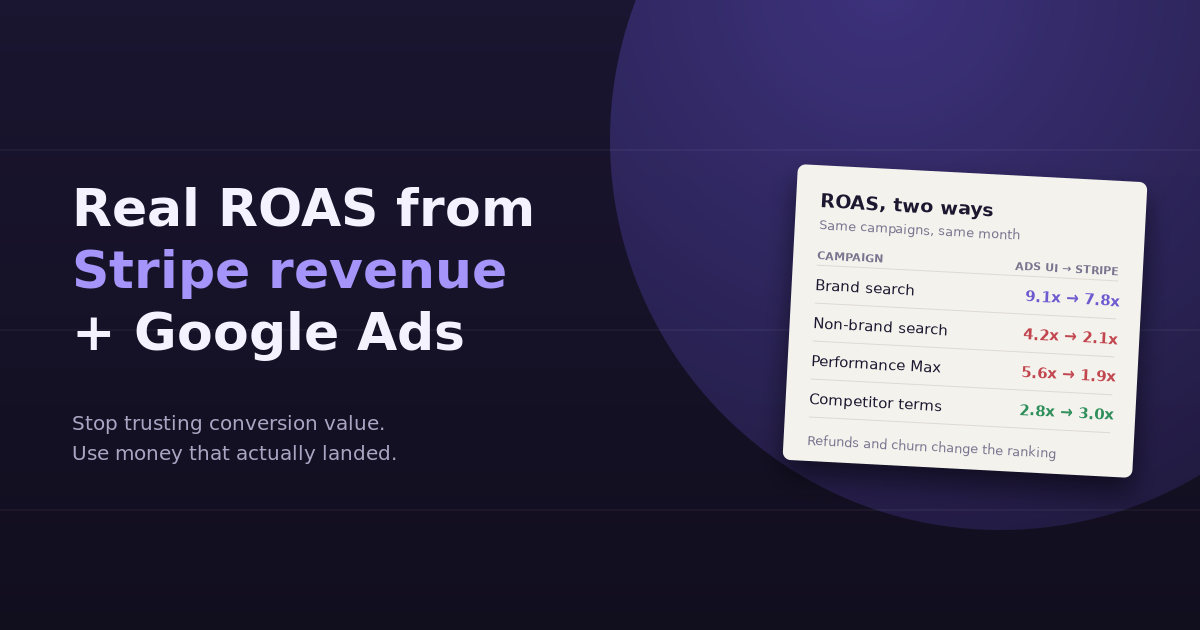
A SaaS company spends $20,000 in a month across four campaigns. Google Ads, using a fixed $150 value per trial sign-up, reports ROAS of 9.1x for brand search, 4.2x for non-brand search, 5.6x for Performance Max, and 2.8x for competitor terms.
After joining Stripe revenue collected in the first 90 days, net of refunds:
- Brand search falls to 7.8x: still excellent, slightly inflated by trials that never paid
- Non-brand search halves to 2.1x: many trials, lower conversion to paid
- Performance Max drops to 1.9x: a large share of its sign-ups came from low-intent placements and churned quickly
- Competitor terms rises to 3.0x: fewer sign-ups, but buyers who paid and stayed
The ranking changes. The campaign that looked second-best in Google Ads is now the worst, and the campaign that looked weakest outperforms two others.
What to Do With True ROAS
- Reallocate budget toward campaigns with high cohort ROAS, not high platform ROAS
- Replace static conversion values with real revenue via offline conversion uploads, so bidding learns from what customers actually pay
- Move the conversion point from trial start to first successful payment if trials are a weak predictor of revenue
- Review Performance Max placements and asset groups if its revenue quality lags its reported ROAS
- Set targets on true ROAS and check platform ROAS only as a leading indicator
Common Pitfalls
- Losing the click ID during redirects or across subdomains, which breaks the link between ad and payment
- Comparing different time windows, such as this month’s spend with this month’s revenue for subscription customers acquired months ago
- Counting gross instead of net revenue, ignoring refunds and disputes
- Attributing renewals forever without a fixed window, which makes old campaigns look better every month
For more on how platform metrics and real outcomes diverge, see our guide to Google Ads metrics, and for what healthy numbers look like, our breakdown of PPC benchmarks. For a broader view of joining sources like this, our guide to building a marketing data warehouse covers the infrastructure route.
Frequently Asked Questions
Why is my Google Ads ROAS different from my actual revenue?
Google Ads calculates ROAS from the conversion values it tracks, which may be estimates, may include trials or failed payments, and don't account for refunds or later subscription renewals. Revenue in Stripe reflects what customers actually paid.
How do I connect Stripe to Google Ads?
Capture the Google Ads click ID and UTM parameters when a visitor signs up, store them on the customer record and in Stripe metadata, then either upload payments to Google Ads as offline conversions or join Stripe revenue with campaign spend in a reporting tool.
Should I use first payment or lifetime value for ROAS?
Use both for different purposes. First-payment ROAS is a fast, comparable signal. Cohort ROAS over a fixed window, such as 90 days, is a more honest comparison between campaigns. Projected lifetime value is useful for planning but should be labeled as an estimate.
Can Google Ads optimize for real Stripe revenue?
Yes. Uploading actual payment amounts as offline conversions, tied to the original click ID, lets smart bidding strategies like Target ROAS optimize toward real revenue instead of placeholder values.
How do refunds affect ROAS?
Refunds reduce real revenue but usually don't reduce the conversion value already recorded in Google Ads. Unless you adjust or retract conversions, platform ROAS stays higher than true ROAS for campaigns with high refund rates.
What's a good true ROAS for SaaS?
It depends on margins, payback targets, and churn. Many teams judge campaigns on how quickly cohort revenue recovers acquisition cost rather than on a fixed ROAS benchmark. Compare campaigns against each other and against your own payback goals.
Judge campaigns on money that actually landed. Connect Google Ads and Stripe to ConvoData, ask for true ROAS by campaign, and rebalance budget from the same chat. Plans start at $39/month.