


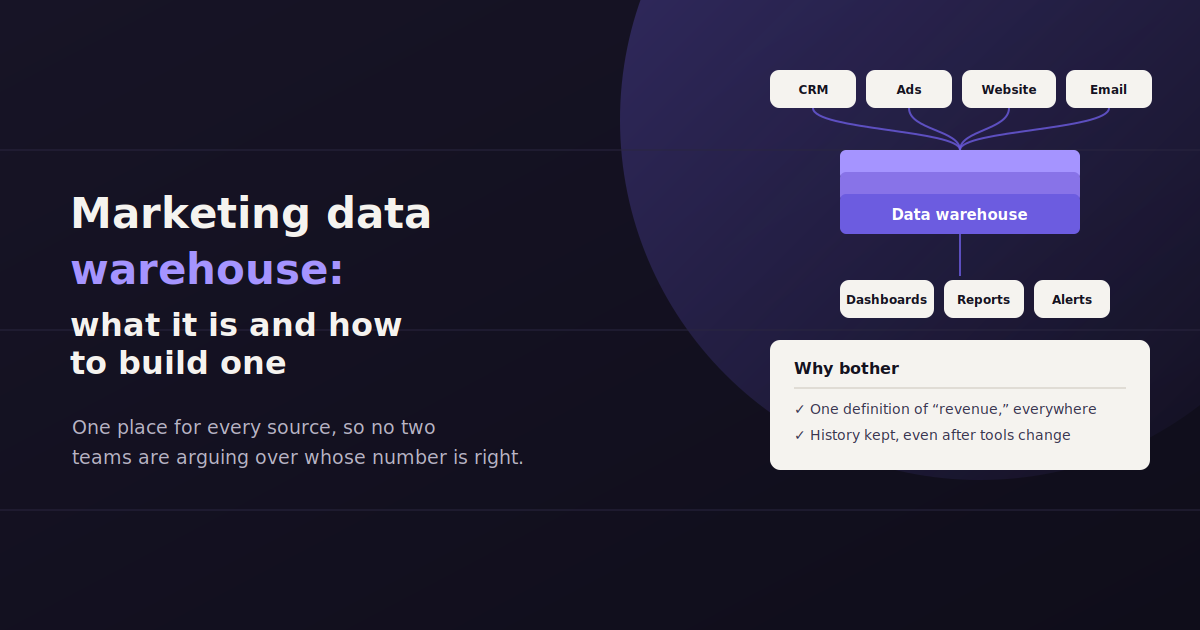
A marketing data warehouse is a centralized database that stores marketing data pulled from every channel a team runs — ad platforms, analytics tools, CRM, email, and more — in one place, structured so it can be queried and reported on consistently.
Teams usually reach for one at a specific point of pain: too many data sources, too much history lost to platform retention limits, or too many people building slightly different numbers from the same underlying campaigns.
This guide covers what a marketing data warehouse actually is, how the architecture behind it works, the platforms teams commonly use, how to tell whether you genuinely need one yet, and how to build one without turning it into a permanent side project.
What Is a Marketing Data Warehouse?
At its core, a marketing data warehouse is a database purpose-built to hold structured data from many sources, organized so that data from different platforms can be compared, combined, and queried together.
It’s different from the platforms that generate the data in the first place. Google Ads has its own internal reporting, GA4 has its own, and a CRM has its own — a warehouse instead pulls copies of that data out of each platform and stores it centrally, under one consistent structure.
The word “warehouse” is doing real work here: like a physical warehouse, it’s built for storage and retrieval at scale, not for the day-to-day operation of any single channel. Nobody manages a Google Ads campaign from inside the warehouse; they manage it in Google Ads, and the warehouse just keeps a structured historical copy of the results.
Why Marketing Teams Build a Data Warehouse
Teams build a marketing data warehouse to combine data across channels for cross-channel analysis, retain history beyond what ad platforms keep natively, give multiple tools and teams access to the same clean numbers, and support custom analysis that off-the-shelf dashboards can’t do.
The decision to build a warehouse is rarely about a single report. It’s usually a response to a few recurring frustrations that keep showing up once a marketing stack passes a certain size.
Most native ad platforms only retain detailed historical data for a limited window, often 12 to 24 months, after which granular data becomes harder or impossible to pull. A warehouse keeps its own permanent copy, so year-over-year and multi-year trend analysis doesn’t depend on a platform’s retention policy.
Cross-channel analysis — comparing performance across Google Ads, Meta, email, and organic requires the data to live somewhere they can all be joined together, which no single platform’s native reporting can do.
Historical retention — a warehouse keeps data as long as you want, independent of how long the source platform retains it natively.
One source of truth — multiple tools and teams querying the same warehouse get consistent numbers, instead of each pulling slightly different exports from each platform.
Custom metrics and blended KPIs — calculations that combine data from more than one source, like true customer acquisition cost across all paid channels, are far easier to build on top of centralized data.
Support for other tools — a warehouse can feed a BI tool, a data science model, or a reporting platform, serving as the shared backbone behind several downstream uses at once.
How a Marketing Data Warehouse Works
The architecture behind a marketing data warehouse follows a fairly consistent pattern across teams, even though the specific tools chosen at each layer vary widely.
Data starts in the source systems — ad platforms, analytics tools, a CRM, email platforms — and has to move from each of those into the warehouse itself before anyone can query it. That movement is handled by a connector or pipeline layer, then the warehouse stores it, and a separate reporting or BI layer sits on top to make it usable.
Source Systems
These are the platforms generating raw marketing data in the first place: Google Ads, Meta Ads, GA4, a CRM like HubSpot, email platforms, and any other channel a team tracks. Each has its own API and its own way of structuring data.
ETL / ELT Pipeline
ETL (extract, transform, load) or ELT (extract, load, transform) tools move data out of source systems and into the warehouse, handling authentication, scheduling, and reformatting along the way. Dedicated connector tools like Supermetrics, Windsor.ai, and Funnel.io specialize in this layer for marketing data specifically.
The distinction between ETL and ELT is mostly about when transformation happens — before loading into the warehouse, or after, using the warehouse’s own processing power. For most marketing teams the practical difference is minor; what matters more is whether the pipeline is reliable and keeps running without someone babysitting it.
The Warehouse Itself
This is where the data actually lives once it’s pulled from each source: a structured, queryable database designed to handle large volumes of historical data efficiently. Google BigQuery is the most common choice for marketing teams already in the Google ecosystem, alongside alternatives like Snowflake and Amazon Redshift.
Reporting and BI Layer
Once data is centralized, a BI or visualization tool connects to the warehouse to build the actual dashboards and reports people look at. Looker Studio and Tableau are common choices here, though the warehouse itself is tool-agnostic — you can point more than one BI tool at the same warehouse.
Popular Data Warehouse Platforms for Marketing Data
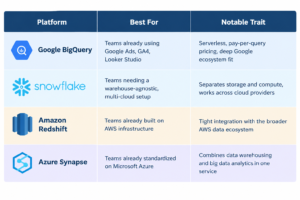
Google BigQuery, Snowflake, and Amazon Redshift are the three platforms marketing teams reach for most often, each differing mainly in pricing model, ecosystem fit, and how much infrastructure management they require.
Most marketing teams don’t need to evaluate every warehouse platform on the market — a small handful cover the vast majority of real-world setups, and the right choice often comes down to what the rest of the company already uses.
Data Warehouse vs. Data Lake vs. Reporting Tool
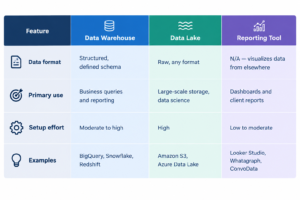
These three terms get used loosely and interchangeably, which causes real confusion when a team is deciding what to actually build or buy.
A data warehouse stores structured data, organized into defined tables, ready to query. A data lake stores raw data in its original format, structured or not, and typically requires more processing before it’s usable for reporting. A reporting tool is neither — it’s the layer that visualizes data, whether that data lives in a warehouse, a lake, or is pulled live from source platforms with no warehouse at all.
Do You Actually Need a Marketing Data Warehouse?
A marketing data warehouse makes sense once a team needs long-term history beyond platform retention limits, regularly blends five or more data sources, or supports multiple tools and teams querying the same numbers — smaller setups are usually better served by a reporting tool with native connectors instead.
Building a warehouse is a real infrastructure investment, and it’s genuinely overkill for a lot of marketing teams. Before committing to one, it’s worth being honest about whether the underlying problem actually requires it.
A useful test: if the real need is a handful of clean, current reports for a handful of clients or channels, a reporting or connector tool that pulls data live probably solves it faster and cheaper than standing up and maintaining a warehouse. A warehouse earns its cost when the need is broader — long historical analysis, many data sources feeding multiple downstream tools, or a data team that wants to build custom models on top of marketing data.
You probably need a warehouse if: you’re regularly blending five or more data sources, need historical data beyond what platforms retain natively, or have multiple teams and tools that all need to query the same underlying numbers.
You probably don’t need one yet if: your reporting need is a handful of channels, a handful of clients, and a reasonably current view of performance — connector or reporting tools can usually deliver that without warehouse infrastructure.
A lighter middle ground exists: some teams use a connector tool feeding directly into a BI tool or spreadsheet, without a dedicated warehouse layer, until the data volume or complexity actually justifies one.
How to Build a Marketing Data Warehouse
Building a marketing data warehouse is a multi-step project, and teams that succeed at it tend to move through the same rough sequence, even if the specific tools chosen differ.
Skipping the planning steps to jump straight into connecting data sources is the most common way this kind of project stalls out or produces a warehouse nobody trusts.
Define what questions the warehouse needs to answer. Starting from specific reporting needs, rather than “centralize everything,” keeps the project scoped and prevents it from becoming an open-ended data-hoarding exercise.
Choose a warehouse platform. Match the choice to your existing infrastructure — a team already on Google Cloud has an easier path with BigQuery than starting fresh with an unrelated ecosystem.
Set up ETL/ELT pipelines for each data source. Use dedicated connector tools where available rather than building custom API integrations from scratch, unless a source has no existing connector.
Design a consistent schema. Agree on naming conventions and metric definitions before loading data, so “conversions” means the same thing whether it came from Google Ads or Meta.
Build the reporting layer on top. Connect a BI tool to the warehouse and build the actual dashboards and reports people will use day to day.
Assign ownership. A warehouse with no clear owner tends to break silently when a connector fails or a schema changes, so someone needs to be responsible for monitoring pipeline health.
Common Mistakes When Building a Marketing Data Warehouse
A few recurring mistakes account for most failed or abandoned warehouse projects, and they’re worth watching for deliberately rather than discovering the hard way.
The most common is scope creep — trying to centralize every possible data source on day one instead of starting with the two or three that actually drive current reporting needs. A narrower first version that actually ships beats a comprehensive one that never gets finished.
The second is skipping schema planning and metric standardization. Data flowing into a warehouse with no agreed-upon definitions just centralizes inconsistency instead of fixing it, and it’s much harder to untangle after the fact than to define upfront.
The third is treating the warehouse as a one-time build rather than ongoing infrastructure. Connectors break, source platforms change their APIs, and someone needs to notice and fix it, or the warehouse quietly goes stale while everyone assumes it’s still current.
When a Warehouse Is More Than You Need
It’s worth being direct about the other side of this decision: a lot of marketing teams considering a data warehouse are actually trying to solve a reporting problem, not a data infrastructure problem.
If the real goal is getting a clear answer about how campaigns are performing across a handful of channels, a tool that connects directly to your data sources and reports on it without a warehouse in between can get there with far less setup and no infrastructure to maintain.
ConvoData is built for that narrower case — it connects to marketing data sources directly and lets you ask a plain-English question, like which channel drove the most conversions this month, and returns a live answer plus a suggested next step, without requiring a warehouse, a schema, or a BI layer in between. It currently covers 14 live integrations out of a 27-integration roadmap, with plans starting at $39/month. For teams with genuinely complex, multi-team data needs, a warehouse still makes sense — but it’s worth ruling out the simpler option first.
A warehouse is only as good as what feeds it — see our guides to data ingestion and ETL and data mapping for the pipeline that gets data there in the first place. Once it is built, our guide to data-driven marketing covers how teams actually put a centralized warehouse to use.
Frequently Asked Questions
What is a marketing data warehouse?
A marketing data warehouse is a centralized database that stores structured marketing data pulled from ad platforms, analytics tools, CRM systems, and other sources in one place, so it can be queried and reported on consistently across channels.
Do small marketing teams need a data warehouse?
Usually not. Teams reporting on a handful of channels or clients are typically better served by a connector or reporting tool that pulls data directly, since building and maintaining a warehouse is a real infrastructure investment that only pays off at larger data volume and complexity.
What is the difference between a data warehouse and a data lake?
A data warehouse stores structured data organized into defined, queryable tables. A data lake stores raw data in its original format, structured or not, and typically needs more processing before it's usable for reporting or analysis.
What tools are used to build a marketing data warehouse?
A typical setup includes a warehouse platform like Google BigQuery, Snowflake, or Amazon Redshift, an ETL or ELT connector tool like Supermetrics or Windsor.ai to move data in, and a BI tool like Looker Studio or Tableau to build reports on top.
How long does it take to build a marketing data warehouse?
It varies widely with scope, but a focused first version covering a handful of core data sources commonly takes several weeks to a few months, including pipeline setup, schema design, and building the initial reporting layer.
Is there an alternative to building a data warehouse for marketing reporting?
Yes. Tools that connect directly to marketing data sources and generate reports or answer questions without a warehouse layer, such as dashboard platforms or conversational tools like ConvoData, can cover many teams' reporting needs without the infrastructure investment a warehouse requires.
Before you commit to building and maintaining a data warehouse, see whether a direct connection gets you there faster. ConvoData connects to your marketing data sources and answers plain-English questions instantly, with plans starting at $39/month.