


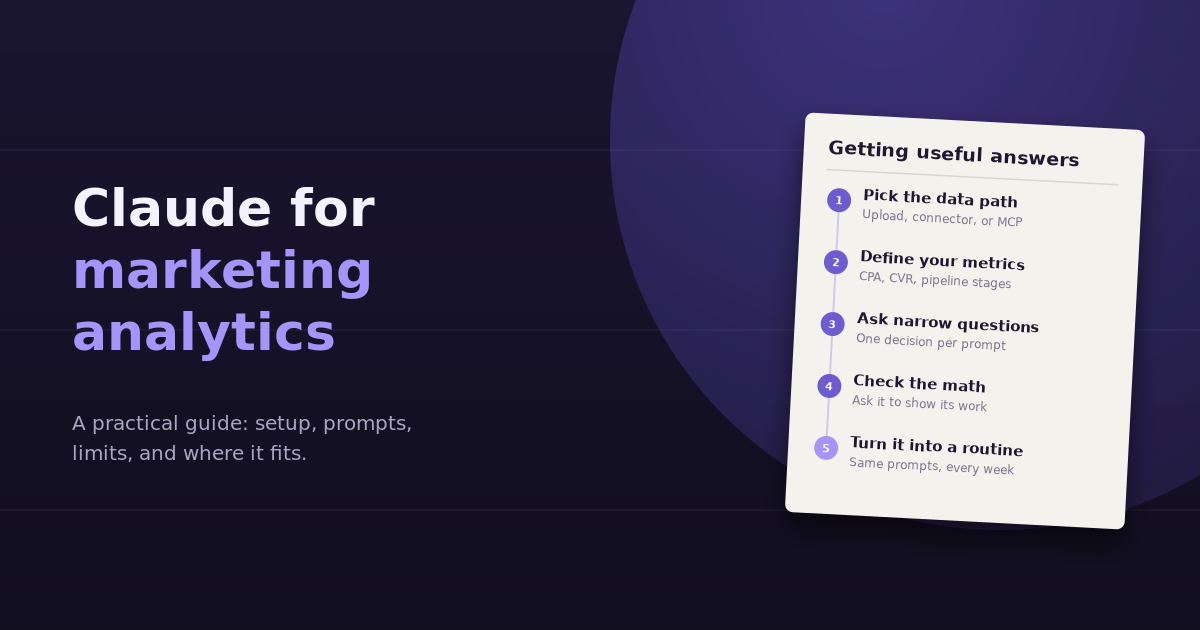
Claude for marketing analytics can mean anything from pasting a table into a chat to a fully connected setup where Claude queries GA4, ad platforms, and your CRM directly. All of these can work. The difference between a helpful setup and a frustrating one comes down to three decisions: how the data reaches Claude, how clearly your metrics are defined, and how you phrase questions.
This guide covers each data path and its trade-offs, a setup that produces reliable answers, prompts that work well, and the limits worth knowing before you trust Claude’s numbers in a client report.
What Claude Is Good At in Marketing Analysis
Claude is a general-purpose AI assistant, not a dedicated analytics platform, but several of its strengths map well onto analysis work:
- Working through files with code. When you upload a CSV or spreadsheet, Claude can analyze it by writing and running code, which makes calculations, sorting, and grouping far more reliable than reasoning about numbers in text.
- Long context. It can take in large exports, long reports, or several files at once, and keep track of what’s in them across a conversation.
- Explaining and structuring. It’s strong at turning a messy set of findings into a clear narrative, which is often the hardest part of reporting.
- Building visual outputs. It can produce charts and small interactive dashboards from your data.
- Connecting to tools. Through connectors and the Model Context Protocol (MCP), Claude can call external services, including analytics and ad platforms, rather than relying only on files you upload.
Step 1: Choose How Data Reaches Claude
| Data path | Setup effort | Freshness | Best for |
|---|---|---|---|
| Paste or upload exports | None | As old as the export | One-off questions, files with no API |
| Projects with saved files and instructions | Low | As old as the files | Recurring analysis where context (definitions, goals) matters |
| Connectors and MCP servers | Medium to high | Live | Technical users who want Claude to query platforms directly |
| A dedicated analytics tool with its own chat | Low per source | Live | Teams that want connected, multi-source answers without maintaining servers |
If you’re just getting started, uploads in a Project are the fastest path. If you find yourself exporting the same reports every week, it’s time to look at live connections. Our explainer on what an MCP server is covers how the live option works.
Step 2: Give Claude Your Definitions
Most wrong answers in AI-assisted analysis come from ambiguous definitions, not bad math. Before asking anything, tell Claude:
- What counts as a conversion. Which GA4 key event, which Google Ads conversion action, which HubSpot lifecycle stage
- Your targets. Target CPA, ROAS, or cost per SQL, so Claude can judge performance against them
- Your attribution model. First touch, last touch, or platform-reported
- Your date conventions. Calendar months or rolling 28 days; which timezone
- What each file contains. Source platform, date range, filters applied
In a Claude Project, put this in the project instructions or a short “metrics glossary” document so it applies to every conversation automatically.
Step 3: Ask Narrow Questions
The same rule applies to Claude as to any analysis tool: one decision per prompt, with a metric, a time range, a comparison, and a breakdown.
Instead of: “Analyze our Google Ads performance.”
Try: “Using the attached Google Ads export for September vs August, which campaigns had the biggest increase in cost per conversion? For each, show whether CPC or conversion rate changed more.”
Good prompts for common jobs:
- “Rank landing pages by the change in key events between the two attached GA4 exports. Exclude pages with fewer than 200 sessions in either period.”
- “From the Search Console export, list queries ranking in positions 8 to 20 with more than 500 impressions, grouped by the page that ranks.”
- “Combine the attached HubSpot contacts export and Google Ads campaign report by campaign name, then calculate cost per MQL. Flag any campaign names that don’t match between the two files.”
- “Draft a five-bullet monthly summary for a client from these results. Lead with what changed and why; avoid jargon.”
That third prompt includes an instruction to flag mismatches, which matters. Asking Claude to surface data problems rather than silently work around them makes the answer more trustworthy.
Step 4: Check the Math
Claude is careful with numbers when it analyzes files with code, but the answer can still be wrong if the inputs were. Build a habit:
- Ask Claude to show the table or calculation behind each conclusion
- Spot-check one or two figures against the source platform
- Ask “what assumptions did you make?” when an answer depends on interpretation
- Be wary of conclusions from small numbers; ask Claude to note sample sizes
This takes a minute and catches most problems before they reach a report.
Step 5: Turn It Into a Routine
The value of AI-assisted analysis compounds when it’s consistent. Save your best prompts, run them on the same cadence, and keep the definitions stable so this month’s answer is comparable with last month’s. A simple routine:
- Weekly: what changed most, wasted spend, conversion rate drops on key pages
- Monthly: channel performance against targets, content winners and losers, cost per lead by campaign
- Quarterly: channel mix shift, budget scenarios, leadership summary
Our list of AI prompts for marketing analysis has 25 ready-to-use prompts organized by these cadences.
Limits Worth Knowing
Uploaded data goes stale
With uploads, Claude only knows what’s in the file. Follow-up questions that need fresher data or a different breakdown need a new export.
Live connections take setup and care
Connecting Claude to platforms through MCP gives you live data, but you’re responsible for choosing trustworthy servers, managing credentials, and checking what permissions each one has. Some servers are read-only; others can make changes in your accounts.
Joining sources is your job
Even with several connections, Claude has to work out how campaigns in Google Ads relate to contacts in HubSpot. Consistent naming and UTM conventions make this far more reliable.
It’s not a source of truth
Claude is an analysis layer. Your platforms and your CRM remain the record. Treat Claude’s answers as fast, well-reasoned drafts that you verify before acting on major decisions.
Where a Dedicated Tool Fits
If your team wants the conversational experience of Claude with data that’s already connected, consistent across users, and joined across sources, a purpose-built analytics tool removes most of the setup and maintenance. The trade-off is another subscription, in exchange for not maintaining exports or MCP servers yourself. For a comparison of the options, see our roundup of marketing analytics tools.
Frequently Asked Questions
Can Claude analyze Google Analytics or Google Ads data?
Yes. You can upload exports for Claude to analyze, or connect it to these platforms through connectors or MCP servers so it can query data directly. Uploads are simplest; live connections avoid repeated exports but take more setup.
Is Claude accurate with marketing numbers?
When Claude analyzes uploaded files with code, calculations are generally reliable. Accuracy problems usually come from the inputs: the wrong date range, ambiguous metric names, or incomplete exports. Ask it to show its working and spot-check key figures.
What's the best way to set up Claude for recurring marketing reports?
Use a Project with instructions that define your conversions, targets, attribution model, and date conventions, plus any reference files. Then reuse the same prompts each week or month so results stay comparable.
Can Claude make changes in my ad accounts?
Only if it's connected to a tool or server that has write permissions. Many analytics connections are read-only by design. If you use a server that can make changes, review its permissions carefully and keep a human approval step for anything that affects spend.
Is it safe to share marketing data with Claude?
Aggregated marketing data is generally low-risk, but it's still business information. Follow your organization's AI policy, review your plan's data settings, and avoid uploading files with personal data such as customer emails.
Should I use Claude or a dedicated analytics tool?
Claude is excellent for flexible, one-off analysis and for turning findings into narratives. A dedicated tool is a better fit when you need live, multi-source data, consistent definitions across a team, and the same questions answered every week without manual exports.
Want the conversational experience without maintaining exports or servers? Connect your marketing sources to ConvoData once, then ask questions in plain English against live, joined data, and act on the answer from the same chat. Plans start at $39/month.