


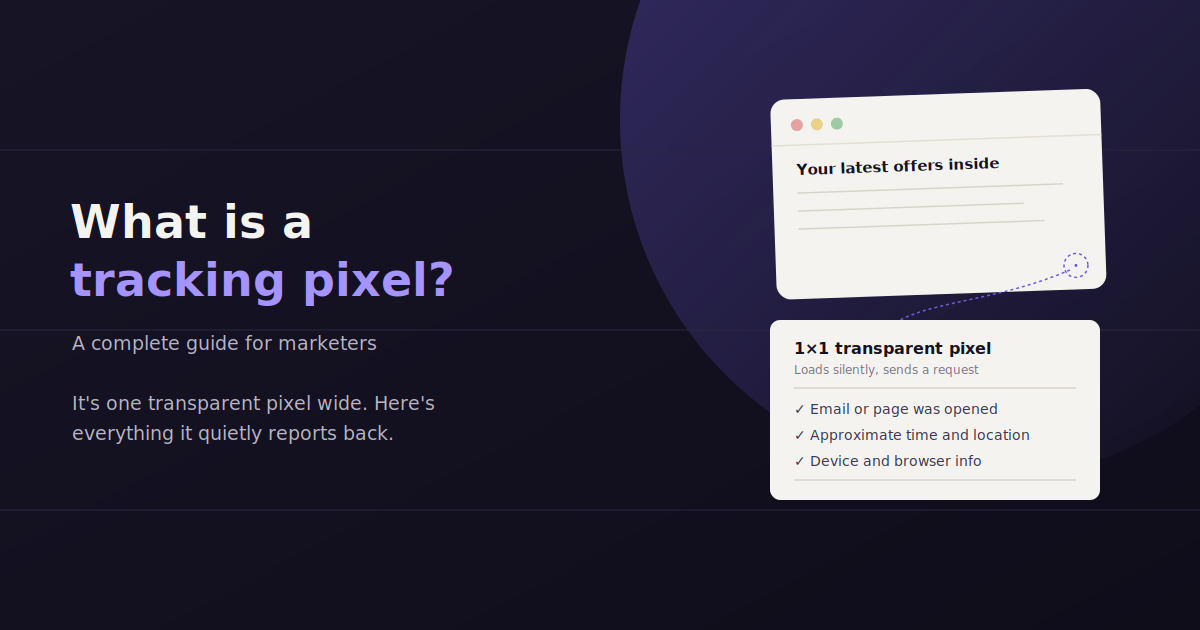
A tracking pixel is a tiny snippet of code that sits on your website or in your emails and quietly reports back when someone views a page, opens a message, or completes a purchase.
It’s one of the oldest tools in digital marketing, and despite years of privacy changes, it’s still the backbone of conversion tracking, retargeting, and attribution for most advertisers running campaigns on Meta, Google, LinkedIn, and TikTok.
The mechanics have shifted a lot since the classic 1×1 image pixel first showed up in the 1990s. Browser restrictions, cookie deprecation, and Apple’s App Tracking Transparency rules have all pushed the technology toward server-side alternatives.
This guide covers what a tracking pixel actually does, how it works under the hood, the different types you’ll run into, how to install one correctly, and the privacy rules that now shape how (and whether) they fire.
What Is a Tracking Pixel, Exactly?
A tracking pixel is a small piece of code — historically a 1×1 transparent image, now often a JavaScript snippet — placed on a webpage or in an email that fires a request back to an advertising or analytics platform whenever that page or email is viewed, letting marketers record visits, conversions, and audience data.
The name comes from the original implementation: a single-pixel, transparent GIF or PNG embedded in a page. It’s invisible to the visitor, but the moment their browser loads the image, it sends a request to the server hosting it — and that server logs the visit.
Modern pixels rarely rely on an actual image file anymore. Most, including the Meta Pixel and the Google Ads conversion tag, are JavaScript snippets that fire on page load or on a specific user action, like clicking a checkout button.
The underlying idea hasn’t changed even though the implementation has: a pixel is a tripwire. Something happens on your site, the pixel notices, and it reports that event back to whichever platform owns the code.
How Tracking Pixels Work (Technically)
When a browser loads a page containing a pixel, it makes an HTTP request to the ad platform’s server — either to fetch a tiny image or to execute a JavaScript function. That request carries information: the page URL, a timestamp, a browser cookie ID, and sometimes custom parameters like an order value.
The receiving server logs that request and matches it to a specific ad campaign, ad set, or individual ad the visitor may have previously clicked. This is how a platform connects ‘this person clicked your ad on Tuesday’ to ‘this person bought something on Thursday.’
Cookies are the glue that makes this matching possible. When a pixel fires, it typically reads or sets a first-party or third-party cookie containing a unique identifier, which is how the same visitor gets recognized across multiple site visits.
Server-side tracking is the newer variant of this process. Instead of the pixel firing directly from the visitor’s browser to the ad platform, the event is sent first to your own server (or a tag management system like a server-side Google Tag Manager container), which then forwards a cleaned-up version of the event to the ad platform.
Server-side setups exist mainly to work around browser-level blocking. Ad blockers, tracking-prevention features in Safari and Firefox, and iOS privacy settings all interfere with pixels that fire directly from the browser — but a request from your own server is much harder to block.
Types of Tracking Pixels You’ll Run Into
Almost every major ad and analytics platform ships its own pixel, and most marketers end up running several at once across the same site.
The exact code differs by platform, but they all follow the same basic pattern: a base snippet that loads on every page, plus event-specific calls that fire on actions like purchases, sign-ups, or add-to-cart clicks.
Meta Pixel — tracks visits and conversions for Facebook and Instagram ad campaigns, and builds retargeting and lookalike audiences from site visitors.
Google Ads conversion tag — reports conversions back to Google Ads so campaigns can optimize toward purchases, leads, or sign-ups rather than just clicks.
LinkedIn Insight Tag — tracks B2B site visits and conversions, and enables retargeting audiences built from LinkedIn’s professional targeting data.
TikTok Pixel — mirrors the Meta Pixel’s role for TikTok ad campaigns, tracking events like content views, add-to-cart, and completed orders.
Email open pixels — a tiny embedded image in an email that reports back when the message is opened, used for open-rate tracking in email marketing platforms.
Google Analytics (GA4) tag — technically a measurement tag rather than an ad pixel, but it works the same way: a JavaScript snippet that fires on page load and sends event data back to Google’s servers.
Why Marketers Use Tracking Pixels
Marketers use tracking pixels for three main reasons: conversion tracking (proving an ad led to a sale or lead), retargeting (showing ads to people who already visited a site), and attribution (figuring out which campaign, ad, or channel deserves credit for a result).
Conversion Tracking
Without a pixel, an ad platform only knows that someone clicked an ad — it has no idea what happened after. A conversion pixel closes that loop by reporting back when the click turned into a purchase, form submission, or sign-up.
That data is what campaign optimization actually runs on. Google Ads and Meta both use conversion signals to decide which audiences, placements, and creative to show more of — without them, you’re bidding blind.
Retargeting and Remarketing Audiences
A pixel lets you build an audience out of people who visited a specific page — a pricing page, a product listing, an abandoned cart — and then show them ads elsewhere on the internet.
This is usually the single highest-converting audience segment an advertiser can build, because it’s made entirely of people who already showed intent by visiting the site in the first place.
Attribution
When a customer sees three ads on three platforms before buying, someone has to decide which one gets credit. Pixels feed the raw event data that attribution models — first-click, last-click, or multi-touch — use to make that call.
This is also where a lot of reporting headaches start, since Meta, Google, and GA4 each run their own attribution logic on their own pixel data, and rarely agree on which channel deserves the credit for the same sale.
How to Install a Tracking Pixel
Installation varies by platform, but the general workflow is the same across Meta, Google, LinkedIn, and TikTok.
Most teams manage pixels through a tag management system rather than hand-editing site code for every new pixel, since it centralizes every tag in one place and avoids a developer ticket every time marketing wants to track a new event.
Generate the base pixel code from the ad platform’s events manager or business settings.
Install it site-wide, either by pasting it into the site’s global header/footer template or, more commonly, through a tag manager like Google Tag Manager.
Add event-specific triggers for actions you want to track — purchase, lead form submission, add-to-cart — usually tied to a button click, page load, or a data layer event.
Verify the pixel is firing using the platform’s own diagnostic tool (Meta Pixel Helper, Google Tag Assistant) before you start spending ad budget against it.
Test a full conversion path end to end — click the ad, complete the action, confirm the event shows up in the platform’s events manager within a few minutes.
Privacy and Cookie-Consent Considerations
Apple’s App Tracking Transparency (ATT) framework and the phase-out of third-party cookies have both reduced how much pixel data advertisers can collect directly from browsers, pushing many teams toward server-side tracking and first-party data collection to keep conversion tracking accurate.
Pixel tracking looks very different today than it did a decade ago, mostly because of two changes: Apple’s App Tracking Transparency (ATT) framework, introduced with iOS 14.5, and the broader industry move away from third-party cookies.
ATT requires apps to ask users for explicit permission before tracking them across other apps and websites. Most users decline, which means a large share of iOS traffic now shows up as unattributable to ad platforms relying purely on browser-side pixels.
Third-party cookies — the small files that let a pixel recognize the same visitor across different sites — are being phased out across major browsers. Safari and Firefox already block them by default; Chrome has been moving in the same direction.
Cookie-consent laws like GDPR and CCPA add another layer: in many regions, a pixel legally cannot fire and set tracking cookies until a visitor explicitly consents through a cookie banner, which means a meaningful share of visitors now opt out before a pixel ever collects data.
Server-side tracking has become the standard response to all three changes. By routing events through your own server first, you reduce reliance on a browser-side cookie that might get blocked, and you gain more control over exactly what data gets forwarded and when.
None of this makes pixels obsolete — it just makes the raw numbers less complete than they used to be. Most advertisers now treat pixel-reported conversions as a directional signal rather than an exact count, and lean on modeled conversions that platforms estimate to fill the gaps.
Common Tracking Pixel Mistakes
Pixel setup looks simple, but small mistakes compound into reporting that quietly misleads an entire team for months.
Catching these early is far cheaper than discovering six months into a campaign that your conversion numbers have been wrong the whole time.
Firing the same event twice — a pixel placed both in the page template and in a tag manager trigger will double-count every conversion.
Forgetting to test after a site redesign — a new checkout flow or updated button IDs can silently break event triggers without any error message.
Ignoring deduplication between browser and server-side events — running both without a shared event ID leads to inflated conversion counts.
Not updating consent settings — a pixel that ignores a visitor’s cookie-consent choice creates compliance risk, not just a data-quality problem.
Assuming pixel-reported ROAS is exact — with ATT and cookie restrictions in place, in-platform numbers are frequently modeled estimates, not a literal count of every conversion.
How Tracking Pixels Feed Into Reporting
Every conversion number in a monthly ad report ultimately traces back to a pixel event somewhere upstream — the spend, CPA, and ROAS figures a client sees are only as accurate as the pixel data feeding them.
That’s also why reporting tools need direct API access to Meta Ads, Google Ads, and GA4 rather than relying on manual exports: pixel-driven conversion counts update constantly, and a report built from a spreadsheet pulled three days ago is already stale.
This is where a conversational reporting layer like ConvoData fits into the picture. Instead of digging through each ad platform’s events manager separately to check whether a pixel-driven conversion metric moved, you can ask a plain-English question — “how did pixel-tracked conversions change this week on Meta versus Google Ads” — and get a live answer pulled directly from your connected accounts, along with a suggested next step.
That matters more now than it used to, precisely because pixel data has gotten messier since ATT and cookie restrictions took hold. Being able to quickly cross-check numbers across platforms, rather than trusting one dashboard in isolation, is a meaningful hedge against reporting a number that turns out to be wrong.
Frequently Asked Questions
What is a tracking pixel in simple terms?
It's a small piece of code — historically a 1x1 invisible image, now usually JavaScript — placed on a website or in an email that reports back to an advertising or analytics platform whenever someone views that page or email, letting marketers track visits, conversions, and ad performance.
Is a tracking pixel the same as a cookie?
No. A pixel is the code that fires and sends the tracking request; a cookie is the small file stored in the browser that holds a unique identifier so the same visitor can be recognized across visits. Pixels typically rely on cookies to work, but they're two different mechanisms.
Do tracking pixels still work after iOS 14.5?
Yes, but with reduced accuracy. Apple's App Tracking Transparency framework means many iOS users decline tracking permission, so a meaningful share of conversions from iOS traffic show up as modeled estimates rather than directly observed pixel events.
What's the difference between browser-side and server-side pixel tracking?
A browser-side pixel fires directly from the visitor's browser to the ad platform and is vulnerable to ad blockers and browser privacy restrictions. A server-side pixel sends the event to your own server first, which then forwards it to the ad platform — making it more resistant to blocking, at the cost of a more involved setup.
Do I need a cookie consent banner to use tracking pixels?
In most regions covered by GDPR, CCPA, or similar privacy laws, yes — pixels that set tracking cookies generally require visitor consent before they're allowed to fire, which is typically collected through a cookie banner.
Which tracking pixel should I install first?
Start with whichever platform you're actively spending ad budget on. If you run Meta ads, install the Meta Pixel; if you run Google Ads, install the Google Ads conversion tag. Most sites eventually run several pixels side by side through a single tag manager.
Can I see pixel-driven conversion data without logging into every ad platform separately?
Yes — a connected reporting tool can pull conversion data from Meta, Google Ads, and GA4 into one place. A conversational option like ConvoData lets you ask directly which campaigns or pixels drove conversions, rather than manually checking each platform's dashboard.
Pixels generate the raw conversion data — turning it into a fast, plain-English answer is a separate problem. ConvoData connects to your ad and analytics accounts so you can ask questions like “which campaign’s pixel conversions dropped this week” and get a live answer with a suggested next step, starting at $39/month.
Pixels are one piece of a broader data tracking setup — see our guide to data tracking in marketing for the fuller picture. Once the data is flowing reliably, our guide to data-driven marketing covers how teams actually act on it.