


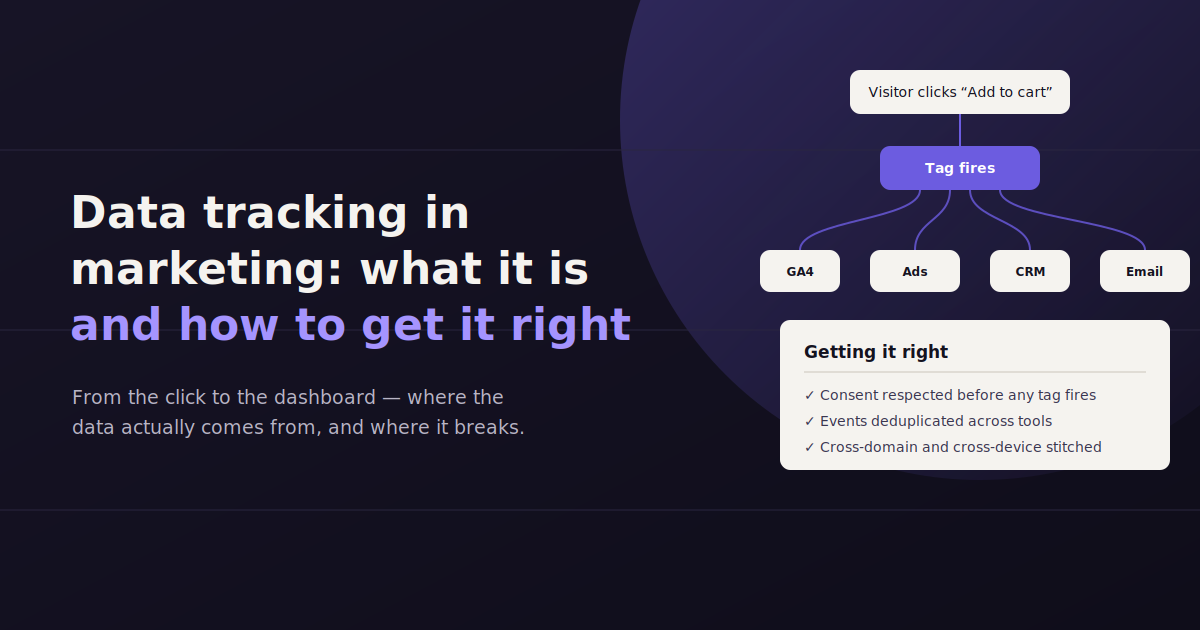
Data tracking is the practice of capturing what happens when someone interacts with your marketing — a click, a page view, a form fill, a purchase — and attaching enough context to that event to know where it came from and what it led to.
It sounds simple until you try to answer a basic question, like which channel actually drove last month’s signups, and realize three different tools give you three different numbers.
That gap usually isn’t a data problem so much as a tracking problem — pixels that were never installed correctly, UTM parameters applied inconsistently, or no shared naming convention across the team building campaigns.
This guide covers what data tracking actually means in a marketing context, why it matters beyond vanity reporting, the core methods teams use, what to track across the funnel, and the accuracy and privacy shifts reshaping how tracking gets built in 2026.
What Data Tracking Means in a Marketing Context
Data tracking in marketing is the process of capturing user actions and attaching source context to them, so a team can trace a result — a lead, a sale, a signup — back to the channel, campaign, or piece of content that caused it.
At its core, tracking answers one question repeatedly: where did this person come from, and what did they do next. Every method covered in this guide exists to answer some version of that.
Tracking is distinct from analytics. Analytics is what you do with the data once it’s collected — the reports, the dashboards, the trend lines. Tracking is the collection layer underneath it, and if it’s broken, no amount of analytics sophistication fixes what’s missing or wrong.
Why Data Tracking Matters More Than Most Teams Treat It
Tracking tends to get treated as a setup task — something configured once at launch and rarely revisited. That’s a mistake, because nearly every downstream marketing decision depends on it being right.
Attribution is the most obvious case. You can’t credit a channel for a conversion you never correctly traced back to it, which means budget quietly drifts toward whatever’s easiest to measure rather than whatever’s actually working.
Budget decisions follow the same logic. A campaign that looks like it’s underperforming might just be under-tracked — conversions happening but not being recorded against it — and cutting its budget on bad data compounds the original tracking gap.
Attribution accuracy — knowing which touchpoint (or combination of touchpoints) actually led to a conversion, not just which one happened to be tracked correctly.
Budget allocation — shifting spend toward what’s working requires trusting the data that says it’s working in the first place.
Proving ROI — reporting to leadership or clients depends entirely on tracking being complete; a report built on partial data understates real performance.
Personalization and retargeting — audience segments and remarketing lists are only as accurate as the events that build them.
The Core Methods Marketers Use to Track Data
Most marketing tracking setups combine several of the methods below rather than relying on just one, because each captures a different piece of the picture.
Tracking Pixels
A pixel is a small snippet of code placed on a page or in an email that fires when a user loads it, sending a signal back to the platform that owns the pixel — Meta, Google, LinkedIn, and most ad platforms use some version of this.
Pixels are how ad platforms build retargeting audiences and measure conversions that happen after someone clicks an ad. They’re also increasingly limited by browser privacy changes, which is covered further down.
UTM Parameters
UTM parameters are tags appended to a URL — source, medium, campaign, and sometimes term or content — that tell an analytics tool exactly where a click came from.
They’re free, platform-agnostic, and the single most common point of failure in a tracking setup, because they rely entirely on being applied consistently by whoever builds the link.
Server-Side Tracking
Server-side tracking sends event data from your own server to a platform, rather than relying on a pixel firing in the user’s browser. It’s more resilient to ad blockers and browser restrictions because the data doesn’t depend on client-side scripts loading successfully.
It takes more setup work than a browser pixel, but it’s become the more reliable option as browsers restrict third-party scripts by default.
CRM Integration
Marketing tracking usually stops at the lead or signup. CRM integration extends it past that point, connecting a tracked lead to what happens to them in sales — did they close, what was the deal size, how long did it take.
This is the piece that turns marketing tracking into revenue attribution instead of just traffic attribution, and it’s the step most small teams skip because it requires marketing and sales tools to actually talk to each other.
What to Track Across the Funnel
Tracking everything equally isn’t the goal — different funnel stages call for different signals, and treating a top-of-funnel visit the same as a bottom-of-funnel purchase intent flattens data that should stay distinct.
| Funnel Stage | What to Track | Example Signals |
|---|---|---|
| Awareness | Where traffic originates and what content it engages with | Source/medium, landing page, scroll depth, video views |
| Consideration | Deeper engagement that signals intent | Return visits, email opens, resource downloads, pricing page views |
| Conversion | The action that defines success for the campaign | Form fills, demo requests, purchases, signups |
| Retention | What happens after the conversion | Repeat purchases, renewal rate, product usage, churn signals |
Data Accuracy and Privacy Considerations
Tracking accuracy has gotten harder over the last several years, not easier, mostly because the browser and regulatory environment it depends on keeps shifting underneath it.
Cookie Deprecation and Signal Loss
Third-party cookies — the mechanism most cross-site tracking historically relied on — have been restricted or blocked by default in most major browsers, and that trend isn’t reversing.
The practical effect is gaps in attribution: a user’s journey across sessions or devices is harder to stitch together than it used to be, and conversion data from ad platforms increasingly relies on modeling to fill in what can no longer be directly observed.
The First-Party Data Shift
First-party data — information collected directly from your own audience, through your own site, email list, or CRM — has become the more durable foundation, since it doesn’t depend on a third party’s cookie surviving.
This is part of why server-side tracking and CRM integration have grown more important. Both rely on data you control directly rather than data passed through a browser mechanism that keeps getting restricted.
Privacy regulations add another layer: consent requirements now shape what can be tracked at all in many regions, which means a tracking plan has to account for what happens when a user declines tracking, not just what happens when they accept it.
How to Build a Tracking Plan
A tracking plan is the document that turns tracking from something ad hoc into something consistent — it defines what gets tracked, how it’s named, and who’s responsible for keeping it accurate.
List every conversion event that matters — form fills, purchases, demo requests, signups — before building anything, so tracking is built around business goals rather than whatever’s easiest to measure.
Define a UTM naming convention — fixed values for source, medium, and campaign, documented somewhere the whole team can reference before building a new link.
Decide which events need server-side tracking — usually the highest-value conversions, where losing data to a blocked pixel is most costly.
Map tracking to your CRM — decide how a tracked lead gets passed into sales tools and what fields carry over, so attribution doesn’t stop at the top of the funnel.
Audit quarterly — pixels break silently when a page gets redesigned or a script gets removed; a scheduled check catches it before a month of data is lost.
Testing and Validating a Tracking Setup Before You Trust It
A tracking setup should never be trusted just because it was configured correctly once. Platforms update their APIs, sites get redesigned, and consent tools change what fires and what doesn’t — any of which can quietly break a pixel or event without an error message anywhere.
Validation doesn’t need to be complicated. Send a handful of real test conversions through each tracked path and confirm the same event shows up, with the same count, in every platform that’s supposed to receive it. If a form fill shows up in the CRM but not in the analytics tool, that gap tells you exactly where the tracking is broken before it costs a month of reporting accuracy.
This is worth doing on a schedule, not just at launch. A quarterly validation pass, timed around any known site or platform changes, catches drift before it shows up as an unexplained dip in a monthly report.
Common Data Tracking Mistakes
Most tracking problems aren’t exotic — they’re small inconsistencies that compound over months until the reported numbers stop matching reality. Once a tracking plan is clean, tools like ConvoData can answer questions across it directly — asking which channel drove signups this month only returns a trustworthy answer if the underlying tracking is solid to begin with.
Broken or inconsistent UTMs — a campaign tagged “Facebook” one month and “facebook_ads” the next fragments what should be one data set into two.
No naming convention documented anywhere — every campaign builder invents their own pattern, and reporting becomes a cleanup project before it can even start.
Duplicate tracking — the same conversion counted by both a pixel and a server-side event with no deduplication logic, inflating results and misleading budget decisions.
Tracking set up once and never audited — a site redesign silently removes a pixel, and nobody notices until a monthly report shows an unexplained drop.
Stopping at the lead — without CRM integration, marketing can prove it generated leads but not which ones actually turned into revenue.
Frequently Asked Questions
What is data tracking in digital marketing?
Data tracking is the process of capturing user actions — clicks, page views, form fills, purchases — and attaching source context to them so a team can trace results back to the specific channel, campaign, or content that caused them.
What's the difference between data tracking and analytics?
Tracking is the collection layer — pixels, UTMs, server-side events — that captures raw data. Analytics is what happens after: the reporting, dashboards, and trend analysis built on top of that collected data. Broken tracking limits what analytics can accurately show.
Why are UTM parameters so often the source of tracking errors?
UTMs rely entirely on being applied consistently by whoever builds the link. Without a documented naming convention, the same channel can end up tagged multiple different ways, splitting what should be one data set into several fragmented ones.
How is cookie deprecation affecting marketing data tracking?
Third-party cookies are increasingly restricted by default in major browsers, which creates gaps in cross-site and cross-device attribution. Ad platforms increasingly rely on modeling to estimate what can no longer be directly observed, making first-party data and server-side tracking more important.
What should be in a marketing tracking plan?
A tracking plan should list every conversion event that matters to the business, define a fixed UTM naming convention, specify which events need server-side tracking, map how leads pass into the CRM, and set a schedule for auditing tracking accuracy.
Does CRM integration matter for marketing data tracking?
Yes — without it, tracking typically stops at the lead or signup. CRM integration connects that tracked lead to what happens afterward in sales, turning marketing tracking into revenue attribution rather than just traffic attribution.
Once your tracking is clean, the harder question is turning it into answers fast. ConvoData connects to your tracking and reporting sources and lets you ask plain-English questions about the results — plans start at $39/month.
Tracking pixels are one of the most common tools behind this kind of tracking — see our complete guide to tracking pixels for how they actually work. And once data is flowing in, understanding the difference between discrete and continuous data helps you pick the right way to analyze it.