


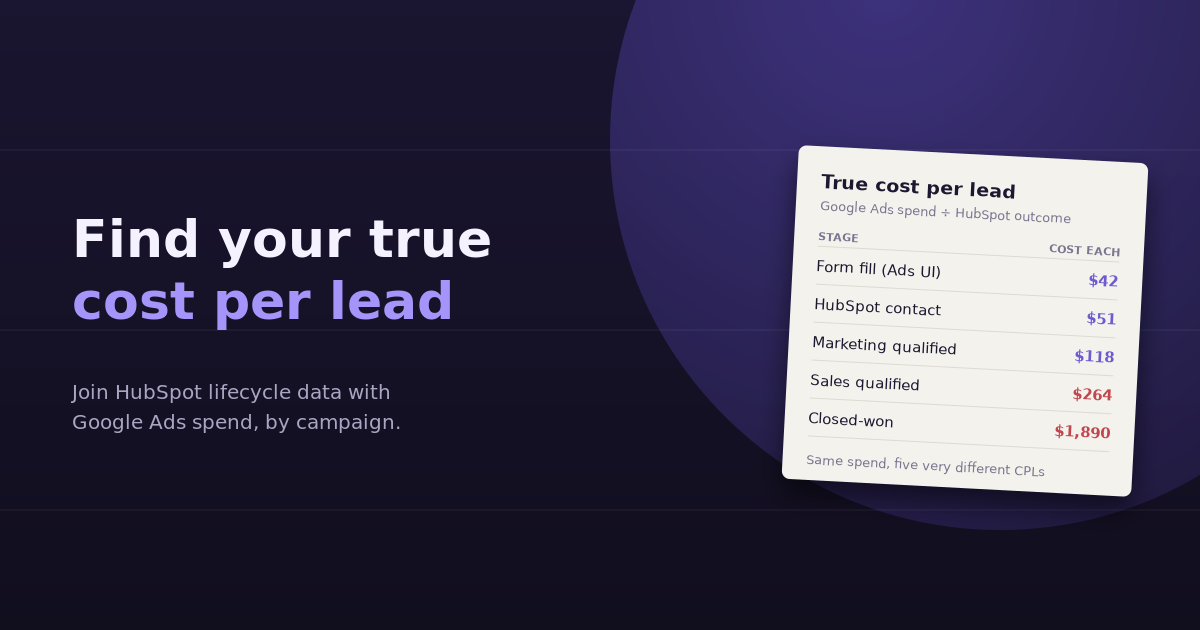
Google Ads will tell you your cost per conversion. It won’t tell you your true cost per lead, because it doesn’t know which of those conversions were duplicates, spam, existing customers, or people who never got anywhere near a sales conversation. HubSpot knows all of that, but it doesn’t know what you paid. Combining the two is how you find out what a lead from each campaign actually costs, and which campaigns produce leads worth paying for.
This guide covers why the numbers disagree, how to connect Google Ads spend to HubSpot lifecycle stages, how to calculate cost per lead at each stage, and what to do once you see the real figures.
Why Google Ads Cost Per Conversion Isn’t Your Cost Per Lead
The gap between what Google Ads reports and what actually lands in your CRM comes from several places:
- Duplicate submissions: the same person fills a form twice, or submits on two devices
- Spam and junk: bot submissions and fake emails count as conversions in Google Ads but get filtered or deleted in HubSpot
- Existing contacts: current customers or old leads re-submitting aren’t new leads at all
- Conversion action scope: Google Ads may count newsletter sign-ups, demo requests, and content downloads together, while sales only cares about some of them
- Attribution windows: Google Ads credits conversions to the click date, while HubSpot records the contact’s creation date
The result is that Google Ads cost per conversion is almost always lower, and sometimes dramatically lower, than the real cost of a qualified lead.
Cost Per Lead at Every Stage
The most useful version of cost per lead isn’t a single number. It’s the same spend divided by the count of leads reaching each lifecycle stage:
| Metric | Formula | What it tells you |
|---|---|---|
| Cost per conversion (Ads UI) | Spend ÷ Google Ads conversions | Platform-reported efficiency; useful for bidding, not for business decisions |
| Cost per new contact | Spend ÷ new HubSpot contacts from that campaign | Removes duplicates, spam, and existing contacts |
| Cost per MQL | Spend ÷ contacts that reached marketing qualified lead | How efficiently the campaign produces leads that fit your criteria |
| Cost per SQL | Spend ÷ contacts that reached sales qualified lead | What it costs to put a real opportunity in front of sales |
| Cost per customer (CAC from ads) | Spend ÷ closed-won deals | The number that should decide whether a campaign gets more budget |
Two campaigns with the same $50 cost per conversion can end up with a $300 and a $1,200 cost per SQL. That difference is invisible in Google Ads.
How to Connect Google Ads Spend to HubSpot Lifecycle Data
Step 1: Connect the Google Ads integration in HubSpot
HubSpot’s ads tool can connect your Google Ads account, which lets HubSpot associate contacts with the ad interactions that brought them in, and with auto-tracking enabled, adds tracking parameters to your ad URLs. This is the simplest way to see contacts, and later deals, attributed to specific campaigns inside HubSpot.
Step 2: Make sure every ad click carries a consistent UTM
Even with the integration, consistent UTM parameters make attribution far more reliable, especially if any ads lead to forms on non-HubSpot pages. At minimum, use a consistent utm_source, utm_medium, and utm_campaign that matches the Google Ads campaign name. Store these on the contact record using hidden form fields or HubSpot’s original source properties.
Step 3: Define your lifecycle stages clearly
Cost per MQL is meaningless if MQL means something different every quarter. Write down exactly what moves a contact to MQL and SQL, and make sure the definitions are applied automatically through workflows or lead scoring wherever possible.
Step 4: Decide on the attribution rule
You need to decide which campaign gets credit when a contact interacts with several. First-touch attribution credits the campaign that created the contact; last-touch credits the final interaction before conversion. For cost per lead by campaign, first-touch or original source is usually the most straightforward starting point. HubSpot’s attribution reports, available on higher tiers, support multi-touch models if you need them.
Step 5: Join spend and outcomes by campaign
Finally, pull spend by campaign from Google Ads and lifecycle counts by campaign from HubSpot for the same date range, and divide. This is the step that usually ends up in a spreadsheet, and the step where errors creep in: mismatched campaign names, different date logic, or contacts with missing source data.
Watch for the Time Lag
Leads take time to progress. A contact created in March may not become an SQL until May, or a customer until August. If you divide March spend by March SQLs, recent campaigns will always look worse than they are, because their leads haven’t had time to mature.
Two ways to handle this:
- Cohort view: group contacts by creation month and track how many reached each stage over time. Compare March’s spend against March’s cohort, however long it takes to progress.
- Lagged view: for a quick read, compare spend from a period one sales cycle ago against SQLs and customers today.
Cohort analysis is more accurate; the lagged view is faster. Either is better than ignoring the lag.
What to Do With the Real Numbers
Once you see cost per SQL and cost per customer by campaign, the decisions get clearer:
- Reallocate budget from campaigns with cheap conversions but expensive SQLs toward campaigns that produce qualified pipeline
- Change what you optimize for: import offline conversions or lifecycle stage changes back into Google Ads, so smart bidding learns from qualified leads rather than raw form fills
- Refine keywords and audiences in campaigns that generate volume but few MQLs; the search terms behind those leads usually reveal the problem
- Fix the form, not just the ads: if junk leads are the issue, add qualifying fields or validation before cutting spend
The offline conversion step is especially valuable. When Google Ads only sees form fills, it optimizes for more form fills, including poor ones. When it sees which clicks became SQLs, it can bid toward the clicks that matter.
A Worked Example
A B2B software company spends $12,000 a month across two non-brand search campaigns. Google Ads reports a $40 cost per conversion for Campaign A and $60 for Campaign B, so A looks 33% more efficient.
Each campaign gets $6,000. In HubSpot, Campaign A’s 150 conversions became 120 new contacts, 45 MQLs, and 14 SQLs. Campaign B’s 100 conversions became 92 new contacts, 46 MQLs, and 23 SQLs. Divide the same $6,000 by those SQL counts and cost per SQL is about $429 for A and $261 for B. The campaign that looked worse in Google Ads produces sales opportunities at roughly 40% lower cost.
Getting There Without the Spreadsheet
The calculation isn’t hard; the joining is. Each month, someone exports campaign spend, exports contacts by source and lifecycle stage, matches campaign names, and rebuilds the same table. When Google Ads and HubSpot are connected to the same analytics tool, the question becomes a sentence: “What was cost per SQL by Google Ads campaign last quarter, using first-touch source?”
For more on choosing which funnel numbers to watch, see our guide to lead generation KPIs, and if you’re still setting up HubSpot, our explainer on what a CRM does covers the fundamentals.
Frequently Asked Questions
Why is my Google Ads cost per conversion lower than my HubSpot cost per lead?
Google Ads counts every tracked conversion, including duplicates, spam submissions, and existing contacts re-submitting forms. HubSpot only creates or updates real contact records, so the same spend divided by fewer genuine leads produces a higher cost per lead.
Which attribution model should I use for cost per lead by campaign?
First-touch or original source is the simplest and most common starting point, because it answers which campaign created the lead. Multi-touch models are more complete but require more setup and consistent tracking across every touchpoint.
How do I account for long sales cycles when calculating cost per SQL?
Use cohort analysis: group contacts by the month they were created and compare that month's spend against how many of those contacts eventually reach SQL or closed-won, however long it takes. Dividing this month's spend by this month's SQLs will understate the performance of recent campaigns.
Can I send HubSpot lifecycle data back to Google Ads?
Yes. HubSpot's Google Ads integration supports sending lifecycle stage events back to Google Ads as offline conversions, so smart bidding can optimize toward qualified leads rather than raw form submissions. Check your HubSpot tier for availability.
What's a good cost per lead for B2B Google Ads?
It varies widely by industry, deal size, and how you define a lead. A more useful benchmark is your own cost per customer relative to customer lifetime value. If cost per customer from ads is well below lifetime value, the campaign is profitable regardless of how its cost per lead compares to industry averages.
Why do some HubSpot contacts have no campaign source?
Missing source data usually comes from tracking gaps: forms on pages without the HubSpot tracking code, stripped UTM parameters during redirects, cookie consent blocking tracking, or contacts imported manually. Auditing these gaps improves every cost per lead calculation that follows.
See what a qualified lead from each campaign really costs. Connect Google Ads and HubSpot to ConvoData, ask for cost per SQL by campaign, and shift budget toward what works from the same chat. Plans start at $39/month.